The Complete Guide to Server Log Analysis for SEO
What Google Analytics and crawl tools can't tell you about how search engines actually interact with your site.
12 min readIn This Guide
1. Why Server Logs Matter for SEO
Most SEO professionals rely on tools like Google Analytics, Google Search Console, a desktop crawler, or a backlink tool to understand how search engines interact with their sites. These tools are valuable, but they all share one critical limitation: they can't show you what actually happened on your server.
Google Analytics only tracks visitors who execute JavaScript. Search Console shows what Google wants to tell you, with a 2-3 day delay. Third-party crawlers simulate what a bot might do, not what it actually did.
Server logs are the ground truth. Every single request that hits your server is recorded: the exact time Googlebot visited, what URL it requested, what status code your server returned, and how long the response took. No sampling, no JavaScript dependency, no delay.
What logs reveal that other tools miss
- Actual crawl frequency — How often Googlebot really visits each page, not estimates
- Bot response times — How fast your server responds to crawlers, which directly affects crawl rate
- Error visibility — Soft 404s, server errors, and redirect chains that crawlers encounter
- Crawl waste — Resources (JS, CSS, images) consuming crawl budget unnecessarily
- Fake bot detection — Scrapers impersonating Googlebot that skew your understanding of crawler behavior
- Non-Google crawlers — AI bots like GPTBot and ClaudeBot that don't appear in Search Console
If you've ever wondered why Google isn't indexing a page that looks fine in Search Console, server logs often hold the answer: perhaps Googlebot is getting a different response than what you see in your browser.
2. Understanding Crawl Budget
Crawl budget is the number of pages a search engine will crawl on your site within a given timeframe. For small sites (under a few thousand pages), crawl budget is rarely a concern. For larger sites with tens of thousands of pages or more, it becomes a critical optimization factor.
How search engines allocate crawl budget
Google's crawl budget is determined by two factors:
- Crawl rate limit — How fast Google can crawl without degrading your server performance. If your server responds slowly, Google reduces its crawl rate.
- Crawl demand — How much Google wants to crawl based on page importance, freshness, and change frequency.
Server logs let you measure both of these directly. You can see exactly how many requests Googlebot makes per hour, the average response time it receives, and which URLs it prioritizes.
What wastes crawl budget
- Redirect chains — Each redirect in a chain consumes a crawl. A chain of 3+ redirects may cause Googlebot to give up entirely.
- Soft 404s — Pages that return 200 status codes but contain no useful content. Googlebot crawls them, finds nothing, and moves on.
- Duplicate content — Parameter URLs, session IDs, or sort orders creating thousands of duplicate pages.
- Low-value pages — Tag pages, archive pages, or internal search results that consume budget without adding indexable value.
- Resource requests — Googlebot fetches JavaScript, CSS, and images to render pages. Uncached or slow resources eat into your budget.
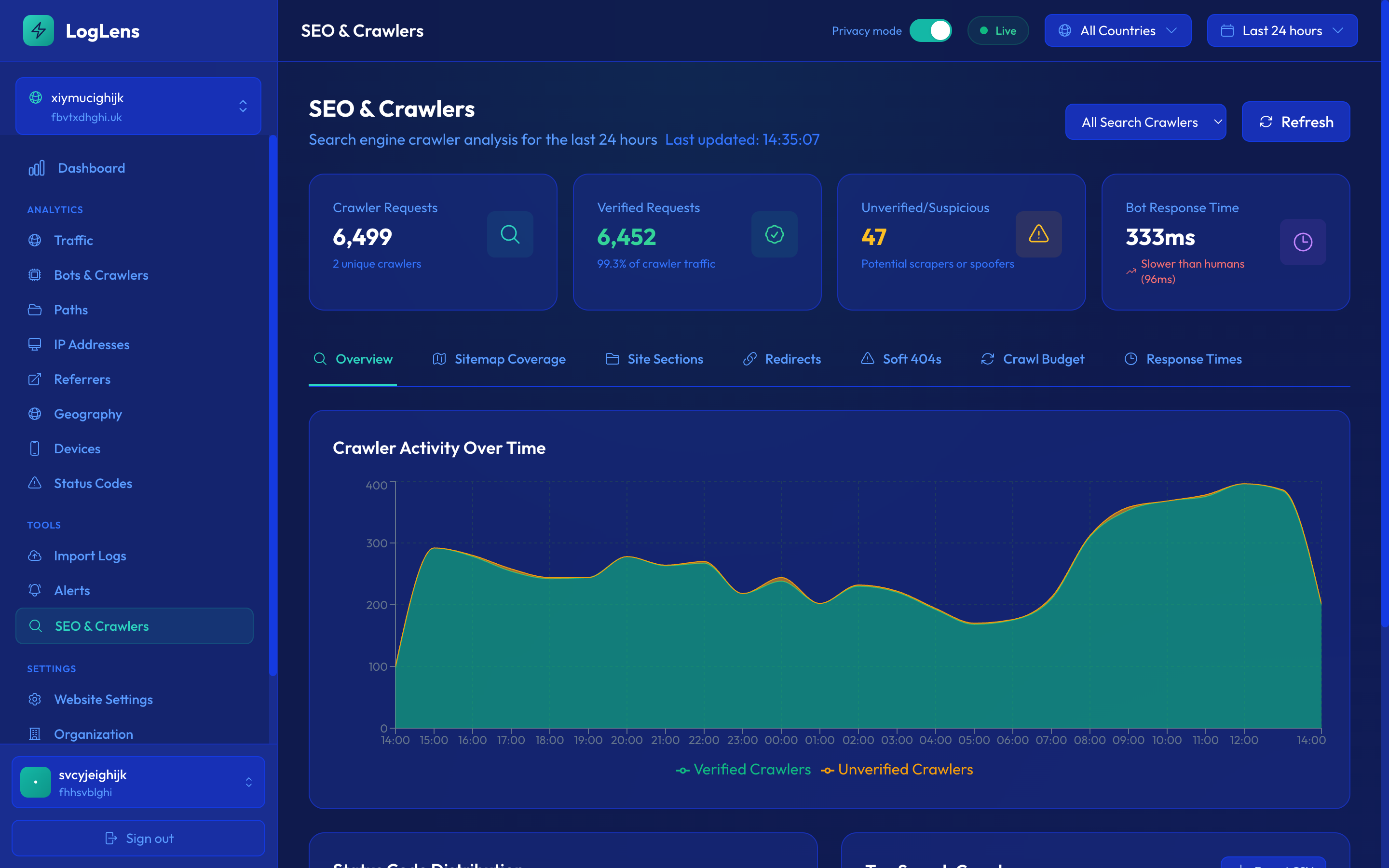
Measuring crawl budget with logs
With server log analysis, you can calculate your effective crawl budget by counting Googlebot requests over time. Key metrics to track:
- Total Googlebot requests per day — Your actual crawl budget in practice
- Unique URLs crawled per day — How many distinct pages Googlebot visits
- Average response time for Googlebot — Slower responses = lower crawl rate
- Status code distribution — What percentage of crawls result in successful responses vs errors
A sudden drop in Googlebot crawl rate (visible in logs but not always in Search Console) often precedes indexing problems. Monitor this metric closely.
3. Bot Verification: The Fake Googlebot Problem
One of the most overlooked aspects of SEO log analysis is bot verification. A significant portion of traffic that identifies itself as "Googlebot" in the user agent string is actually fake.
Why fake bots exist
Scrapers, competitors, and malicious actors often disguise their bots as Googlebot for a simple reason: many websites give Googlebot preferential treatment. Firewalls let it through, servers render JavaScript for it, and rate limits don't apply. By impersonating Googlebot, these bad actors bypass your defenses.
How to verify legitimate bots
Major bot operators (Google, Microsoft, OpenAI, Anthropic) publish their official IP ranges. The only reliable way to verify a bot is to check if the requesting IP address falls within those published ranges:
- Googlebot — Published at googlebot.json, covers all Google crawler IPs
- Bingbot — Published by Microsoft via bingbot.json
- GPTBot — OpenAI publishes ranges at openai.com
- ClaudeBot — Anthropic publishes official ranges
Manually verifying bots by cross-referencing IP ranges is tedious. LogLens automates this process, checking every bot request against official IP ranges in real-time and marking each as "Verified" or "Unverified."
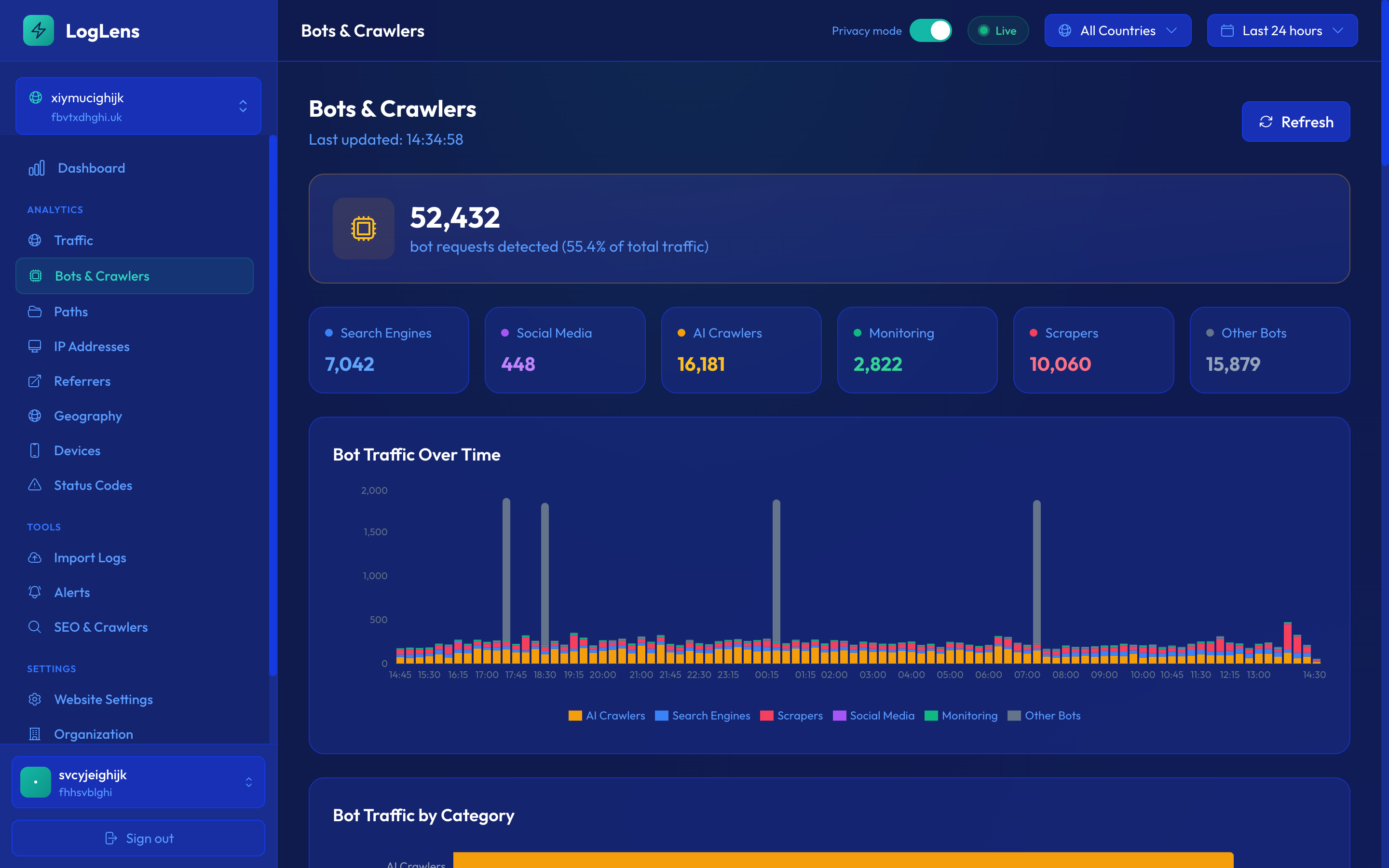
Real-world impact
In practice, we've seen sites where 30-60% of "Googlebot" traffic was actually fake. This has serious implications:
- Skewed analytics — If you're counting fake Googlebot requests as real crawls, your crawl budget estimates are wrong
- Wasted resources — Your server renders JavaScript and serves full pages to scrapers pretending to be Google
- Security risks — Fake bots may be probing for vulnerabilities or scraping content
Always filter for verified bots when analyzing crawler behavior. Unverified "Googlebot" traffic should be analyzed separately as potential scraping or abuse.
4. Sitemap Coverage Analysis
Your XML sitemap tells search engines which pages you want indexed. But how do you know which of those pages search engines actually visit? The gap between "submitted in sitemap" and "actually crawled" is one of the most actionable insights in SEO.
The three coverage buckets
When you cross-reference your sitemap URLs with server log data, every URL falls into one of three categories:
- Recently crawled — URLs in your sitemap that were crawled in the last 30 days. These are in good shape.
- Stale — URLs in your sitemap that haven't been crawled in 30+ days. These may be losing freshness in Google's index.
- Never crawled — URLs in your sitemap that have never been visited by any crawler. These are invisible to search engines despite being in your sitemap.
What "never crawled" pages mean
If a page is in your sitemap but has never been crawled, possible causes include:
- Low internal link equity — The page is poorly linked from other pages, so crawlers never discover it
- Sitemap issues — The sitemap may not be properly submitted or is returning errors
- Crawl budget exhaustion — Google runs out of budget before reaching this page
- Robots.txt blocking — The page (or a parent directory) may be blocked by robots.txt
- New content — The page was recently added and crawlers haven't discovered it yet
Finding crawled-but-not-in-sitemap URLs
The reverse is equally important: URLs that bots are crawling but aren't in your sitemap. This often reveals:
- Orphan pages — Old URLs still being crawled from external links
- Missing sitemap entries — Important pages you forgot to include
- Parameter URLs — Googlebot discovering URL variants you didn't intend to be indexed
Run a sitemap coverage analysis monthly. The ratio of "never crawled" to "total sitemap URLs" is a leading indicator of SEO health — if it's increasing, your crawl budget isn't keeping up with your content.
5. Google Search Console Correlation
Combining server log data with Google Search Console data gives you the most complete picture of your search presence. Server logs show what happened on your server. GSC shows what happened on Google's side.
The four quadrants
When you combine crawl data (from logs) with index data (from GSC), every URL falls into one of four quadrants:
- Crawled + Indexed — The ideal state. Google is visiting the page and has it in the index.
- Crawled + Not Indexed — Google visits the page but chose not to index it. This usually indicates a content quality issue.
- Not Crawled + Indexed — Google has the page indexed (from a previous crawl or inferred from links) but isn't actively visiting it. The index entry may become stale.
- Not Crawled + Not Indexed — The page is essentially invisible to Google. Needs immediate attention.
Correlating search performance with crawl data
GSC provides impressions, clicks, and average position for each URL. By correlating this with crawl frequency from logs, you can identify patterns:
- Pages with high impressions but low crawl frequency may benefit from internal linking to increase crawl priority
- Pages with high crawl frequency but zero impressions may be wasting crawl budget
- Recently crawled pages with declining impressions may have content freshness issues
GSC data is always 2-3 days behind. When investigating a sudden ranking drop, server logs will show you what happened to Googlebot's crawling immediately, while GSC won't reflect it for days.
6. Actionable Optimization Tips
Based on what you find in your log analysis, here are concrete steps to improve your SEO performance.
Fix crawl errors immediately
- Monitor for 5xx errors served to Googlebot — these signal reliability problems and can reduce your crawl rate
- Fix 404s on important pages, especially those with inbound links or sitemap entries
- Eliminate redirect chains by updating links to point directly to the final URL
Improve bot response times
- If average response time to Googlebot exceeds 500ms, investigate server performance
- Serve cached responses to bots where possible
- Reduce page weight — Googlebot has to download the full page to render it
Optimize crawl budget allocation
- Use robots.txt to block low-value pages (internal search results, filter pages, admin pages)
- Use
noindexfor pages that shouldn't be indexed but need to be accessible - Consolidate duplicate content with canonical tags
- Keep your sitemap clean — remove URLs that return non-200 status codes
Strengthen internal linking
- For "never crawled" pages, add internal links from high-traffic pages
- Check that your sitemap is reachable from robots.txt
- Ensure important pages are within 3 clicks of the homepage
Monitor AI crawlers
- AI bots (GPTBot, ClaudeBot) are consuming increasing amounts of crawl bandwidth
- Decide whether you want AI bots to crawl your content and update robots.txt accordingly
- Log analysis is the only way to see the actual impact of AI crawlers on your server resources
Set up weekly monitoring of your key SEO log metrics: Googlebot crawl rate, average response time, coverage ratio, and error rate. Trend changes are more important than absolute numbers.
Key Takeaways
- Server logs are the ground truth for SEO — they show exactly how search engines interact with your site, with no sampling or delay.
- Always verify bots against official IP ranges. A large portion of "Googlebot" traffic is fake.
- Cross-reference your sitemap with actual crawl data to find coverage gaps and wasted budget.
- Combine server logs with Google Search Console data for the complete picture: crawled vs indexed vs ranking.
- Server response time directly affects crawl rate. Keep it under 500ms for optimal crawling.
Start analyzing your crawl data today
LogLens automatically verifies bots, analyzes sitemap coverage, and correlates with Google Search Console.
Join Waitlist