The Guide to Bot Management and AI Crawler Control
How to identify, verify, and manage the growing wave of AI crawlers and automated traffic hitting your website.
11 min readIn This Guide
1. The AI Crawler Explosion
Since 2023, the web has experienced a dramatic surge in automated traffic from AI companies training large language models. Bots like GPTBot (OpenAI), ClaudeBot (Anthropic), and Bytespider (ByteDance) have joined the ranks of traditional search engine crawlers, fundamentally changing the bot landscape for website operators.
The scale of this shift is hard to overstate. Many websites have seen their total bot traffic double or triple, with AI crawlers now accounting for a significant share of all automated requests. Unlike the gradual growth of search engine crawling over the past two decades, the AI crawler explosion happened within months.
Why AI crawlers are different
Traditional search engine bots like Googlebot crawl your site to index it and send you referral traffic. There is a clear exchange of value: you allow crawling, and in return you get visibility in search results. AI crawlers operate on a fundamentally different model:
- No referral traffic — AI training crawlers consume your content but typically don't drive visitors back to your site
- Aggressive crawl rates — Some AI crawlers request pages far more aggressively than search engines, consuming significant server resources
- Full-content extraction — AI crawlers are designed to ingest entire page content for model training, not just to index metadata and snippets
- Rapidly changing landscape — New AI crawlers appear regularly as more companies build foundation models, making it difficult to maintain a complete blocklist
The key AI crawlers to know
- GPTBot — OpenAI's crawler for training data. Identifies as
GPTBot/1.0in user agent strings. - ClaudeBot — Anthropic's web crawler. Respects robots.txt directives.
- Bytespider — ByteDance's crawler, associated with TikTok and their AI products. Known for aggressive crawl rates.
- CCBot — Common Crawl's bot, which builds open datasets used by many AI companies for training.
- Google-Extended — Google's dedicated user agent for Gemini/AI training, separate from Googlebot for search indexing.
- Meta-ExternalAgent — Meta's crawler for AI training purposes.
Blocking Googlebot and blocking Google-Extended are two very different things. Googlebot affects your search rankings. Google-Extended only affects whether your content is used for Gemini AI training. Make sure you understand the distinction before adding robots.txt rules.
2. Understanding Bot Traffic Composition
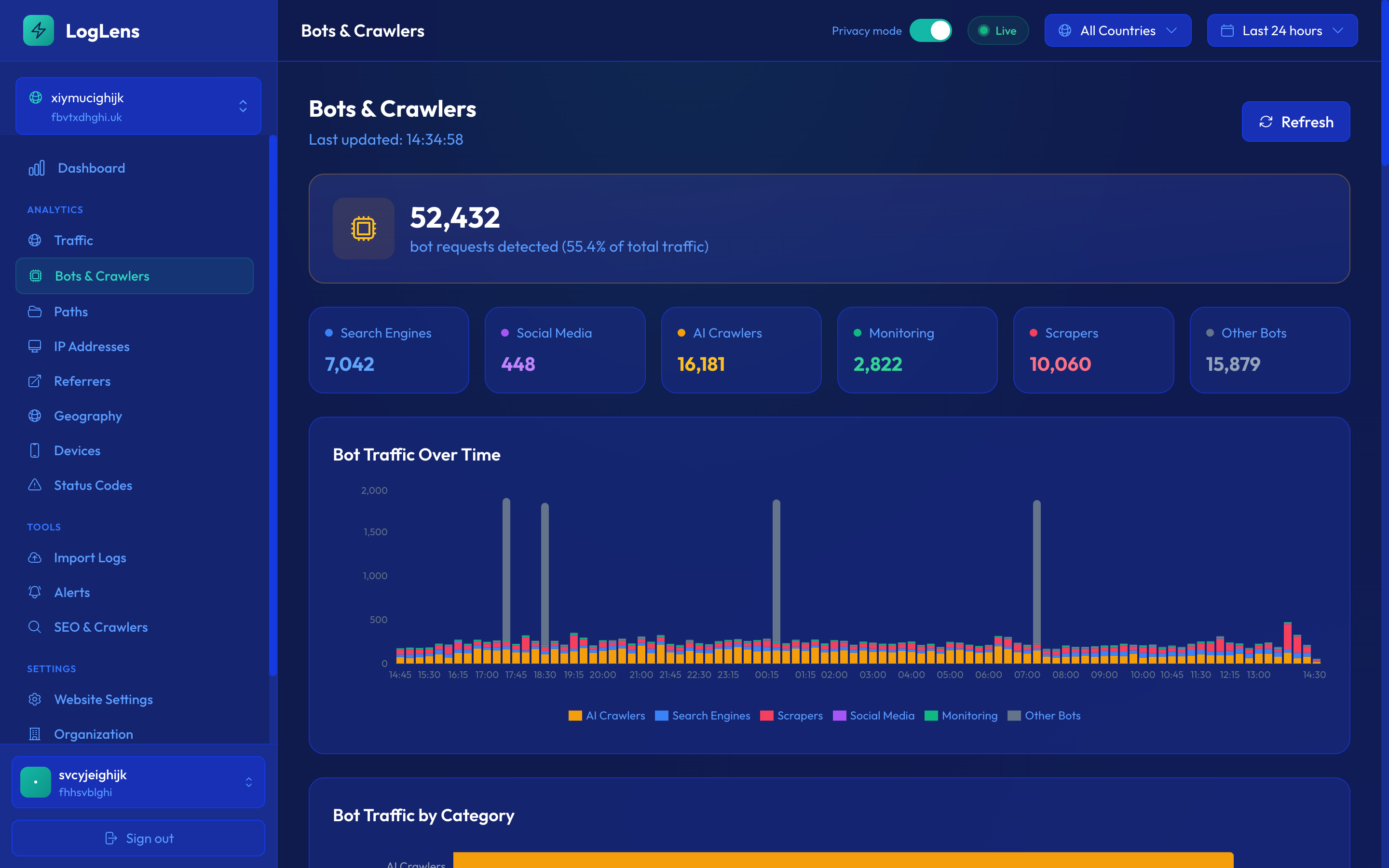
Before making any decisions about bot management, you need to understand what your bot traffic actually looks like. Most website operators are surprised by the breakdown when they first examine their server logs in detail.
Bot categories
All bot traffic generally falls into one of these categories:
- Search engine bots (30-40%) — Googlebot, Bingbot, Yandex, Baidu. These crawl your site for search indexing and directly impact your SEO visibility.
- AI training crawlers (15-25%) — GPTBot, ClaudeBot, CCBot, Bytespider. These ingest content for large language model training. This category has grown rapidly since 2023.
- SEO tools (10-15%) — AhrefsBot, SEMrushBot, MJ12bot (Majestic), DotBot (Moz). These crawl to build link indexes and provide SEO data to their customers.
- Social preview bots (5-10%) — Facebook External Hit, Twitterbot, LinkedInBot, Slackbot. These fetch page metadata when someone shares a URL on social platforms.
- Monitoring bots (3-5%) — UptimeRobot, Pingdom, Site24x7. These check your site availability at regular intervals.
- Feed readers (2-5%) — Feedly, Feedbin, NewsBlur. These fetch RSS/Atom feeds for content syndication.
- Scrapers and unknown (10-20%) — Unidentified bots, content scrapers, price comparison tools, and various automated agents that don't clearly identify themselves.
Why percentages vary by site
These percentages are typical ranges, but your actual composition depends heavily on your site type. Content-heavy media sites tend to attract more AI crawlers. E-commerce sites see more SEO tool traffic. Sites with active social sharing have higher social preview bot percentages. The only way to know your actual breakdown is to analyze your own server logs.
Don't assume your bot traffic matches industry averages. Run a bot traffic audit on your own logs covering at least 30 days. The results will likely surprise you and directly inform your management strategy.
3. Verifying Legitimate vs Fake Bots
A bot claiming to be "Googlebot" in its user agent string is not necessarily Googlebot. A significant portion of bot traffic uses spoofed user agents — scrapers, vulnerability scanners, and other bad actors disguise themselves as well-known bots to bypass rate limits and firewall rules.
How IP verification works
The most reliable way to verify a bot's identity is to check its IP address against the official IP ranges published by the bot operator:
- The bot makes a request, claiming an identity via its user agent string (e.g., "Googlebot/2.1")
- You extract the client IP address from the request
- You check whether that IP falls within the bot operator's published IP ranges
- If the IP matches, the bot is verified as legitimate. If not, the claim is unverified.
Which bots publish IP ranges
Not all bot operators make verification easy. Here is the current state of IP range publication:
- Google — Publishes comprehensive IP ranges for Googlebot in a public JSON file. Well-documented and regularly updated.
- Microsoft — Publishes Bingbot IP ranges in a JSON file similar to Google's format.
- OpenAI — Publishes GPTBot IP ranges on their website. Includes ranges for ChatGPT user browsing and OAI-SearchBot.
- Anthropic — Publishes ClaudeBot IP ranges for verification.
- Apple — Publishes Applebot IP ranges for verification.
- Most SEO tools — AhrefsBot, SEMrush, and others generally do not publish static IP range files, though some support reverse DNS verification.
- Social bots — Facebook, Twitter, and LinkedIn do not publish comprehensive IP ranges for their preview bots.
Why DNS reverse lookup alone is not enough
Some guides recommend using reverse DNS lookups to verify bots: resolve the IP to a hostname, check if it belongs to the claimed organization, then do a forward DNS lookup to confirm. While this works in theory, it has significant practical limitations:
- Slow at scale — DNS lookups add latency. If you're processing millions of log lines, this becomes a bottleneck.
- Not all bots have PTR records — Many legitimate bots don't have properly configured reverse DNS.
- DNS can be spoofed — In certain attack scenarios, DNS responses can be manipulated.
- Inconsistent results — DNS propagation delays can cause temporary verification failures for legitimate bots.
IP range verification using published lists is faster, more reliable, and works offline against historical log data. LogLens uses this approach, checking every bot request against official IP ranges in real-time and flagging unverified claims.
Our data shows that over 30% of traffic claiming to be from well-known bots fails IP verification. This fake bot traffic skews your analytics, wastes server resources, and may pose security risks. Always verify before trusting bot identity claims.
4. Managing Crawl Impact
Every bot request consumes server resources: CPU cycles to process the request, bandwidth to transmit the response, and potentially database queries to generate dynamic content. When bot traffic scales up, this cost becomes material.
Measuring resource consumption per bot
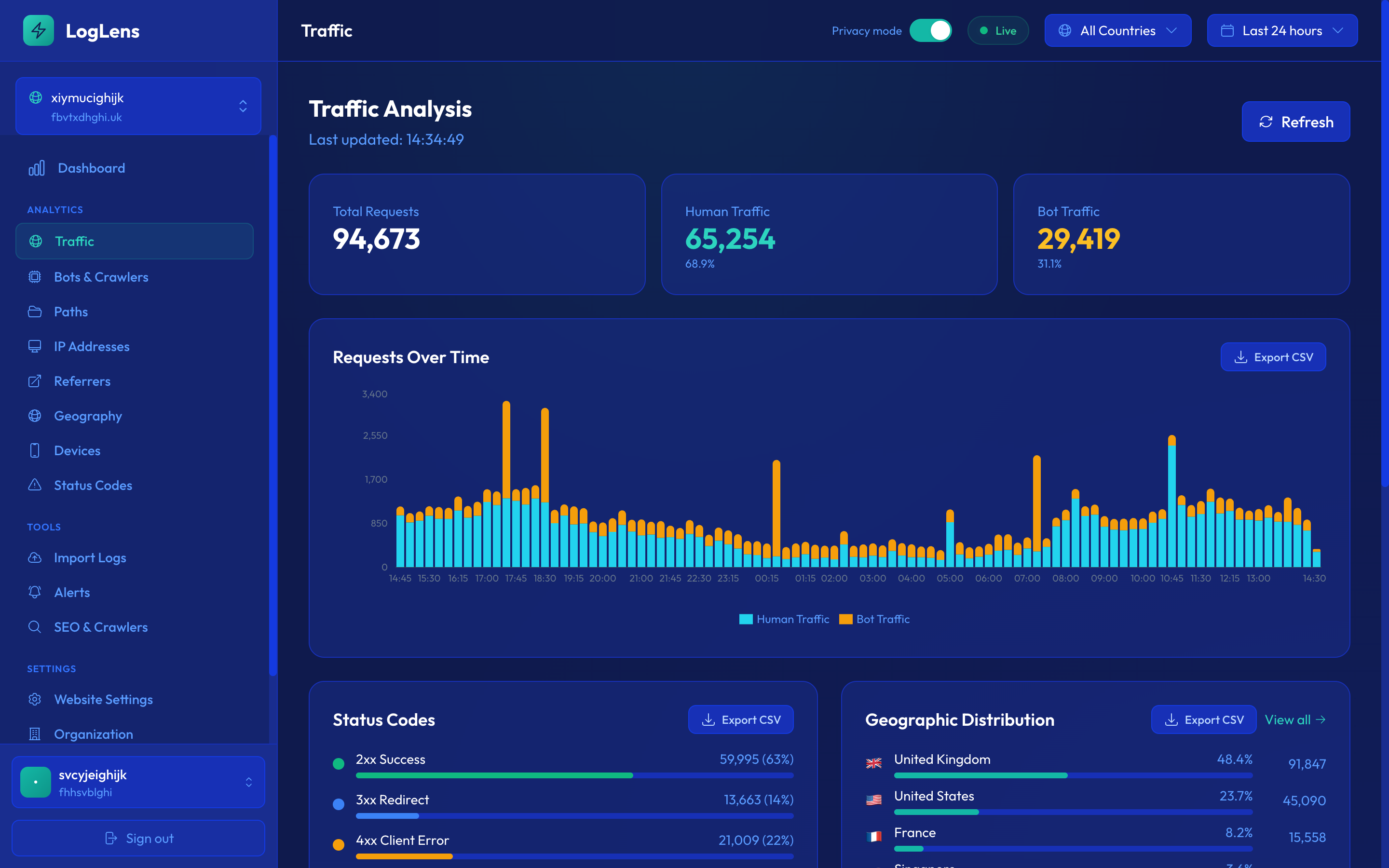
To manage bot impact effectively, you need to measure it at the individual bot level. Key metrics to track for each bot:
- Requests per day — How many requests does this bot make? Some AI crawlers can make tens of thousands of requests per day to a single site.
- Bandwidth consumed — Total bytes transferred to this bot. Bots that download full page content (including images and scripts) consume far more bandwidth than those that only fetch HTML.
- Average response time — How long your server spends processing each request for this bot. Slow responses indicate the bot is hitting resource-intensive pages.
- Status code distribution — What responses the bot receives. High error rates may indicate the bot is hitting problematic URLs.
- Peak request rate — Maximum requests per minute. Burst traffic from aggressive bots can cause performance issues for real users.
Identifying disproportionate consumers
Once you have per-bot metrics, look for outliers. Common patterns that indicate a bot is consuming disproportionate resources:
- A single bot accounting for more than 20% of total bot traffic
- Bots with request rates exceeding 10 requests per second sustained over hours
- Unverified bots consuming more bandwidth than verified search engine crawlers
- Bots repeatedly hitting the same expensive dynamic pages (search results, filtered listings)
The crawl-delay directive
The Crawl-delay directive in robots.txt tells bots to wait a specified number of seconds between requests. However, its effectiveness is limited:
- Googlebot ignores it — Google does not respect Crawl-delay. Instead, they adjust crawl rate based on server response time.
- Bingbot respects it — Microsoft's crawler will honor Crawl-delay values.
- Mixed support among AI crawlers — Some AI crawlers respect Crawl-delay, others don't. Verify through your logs.
- Not a substitute for blocking — If a bot is consuming too many resources, Crawl-delay is a partial solution at best. You may need to block it entirely or implement rate limiting at the server level.
Before blocking any bot, measure its actual impact first. Some bots that appear aggressive by request count are actually lightweight because they only fetch HTML. Others make fewer requests but download every asset on the page, consuming far more bandwidth.
5. Making Informed robots.txt Decisions
Your robots.txt file is the primary mechanism for controlling which bots can access your content. With AI crawlers in the mix, robots.txt decisions have become more nuanced and more consequential than ever.
When to block AI crawlers
There are legitimate reasons to block AI training crawlers from your site:
- Protecting copyrighted content — If your business depends on original content (journalism, research, creative writing), you may want to prevent that content from being used to train AI models without compensation.
- Reducing server load — If AI crawlers are consuming significant server resources and degrading performance for real users, blocking them is a practical necessity.
- Data licensing — Some publishers are negotiating licensing deals with AI companies. Blocking crawlers during negotiation ensures your content isn't ingested for free before a deal is reached.
- Privacy concerns — Sites with user-generated content may want to protect their users' data from being included in training datasets.
When to allow AI crawlers
Blocking isn't always the right call. There are scenarios where allowing AI crawlers benefits you:
- AI-powered search results — Products like ChatGPT with browsing, Perplexity, and Google's AI Overviews use crawled data to generate answers. If your content isn't accessible, you won't appear in AI-generated search results.
- Discovery and brand awareness — When AI assistants reference your content or recommend your products, it drives indirect awareness even without a direct link.
- Open-source or public-interest content — Documentation, educational materials, and public datasets may benefit from wider distribution through AI.
Selective strategies
The most effective approach is usually selective rather than all-or-nothing:
- Allow search bots, block AI trainers — Keep Googlebot and Bingbot allowed while blocking GPTBot, CCBot, and others. This preserves your search visibility while protecting content from AI training.
- Block by specific bot — Block only the most aggressive or least valuable crawlers. Keep bots that might drive AI-powered search traffic.
- Block specific directories — Allow AI crawlers to access some sections (public documentation, marketing pages) while blocking premium or paywalled content.
Monitoring compliance
Adding rules to robots.txt is only half the job. You need to verify that bots actually comply:
- Most major bots respect robots.txt — Googlebot, Bingbot, GPTBot, and ClaudeBot all honor robots.txt directives.
- Some bots don't — Smaller or rogue crawlers may ignore robots.txt entirely. This is technically a violation of web standards but there is no enforcement mechanism beyond blocking at the server level.
- Verify through logs — After adding a block rule, monitor your server logs for requests from the blocked bot. If requests continue, the bot isn't respecting your directive and you'll need to implement server-level blocking (IP blocks, firewall rules, or WAF rules).
robots.txt is a voluntary protocol — it relies on bots choosing to comply. For critical content protection, supplement robots.txt with server-level controls. Log analysis is the only way to verify that your blocks are actually working.
6. AI Bot Policies for Different Site Types
There is no universal "correct" bot policy. The right approach depends entirely on your site's purpose, business model, and content strategy. Here are recommended starting points for common site types.
Media and publishing sites
Media organizations have the strongest case for blocking AI training crawlers. Original journalism, investigative reporting, and editorial content represent significant investment. When AI models are trained on this content and then generate answers that replace the need to visit the source, publishers lose traffic and revenue.
- Block all AI training crawlers (GPTBot, CCBot, Bytespider, Google-Extended)
- Keep search engine bots fully allowed
- Consider allowing AI-powered search bots (like OAI-SearchBot) if you want visibility in AI search results
- Monitor for non-compliant crawlers and implement server-level blocks as needed
E-commerce sites
E-commerce sites have a more nuanced calculation. Product descriptions and reviews are valuable content, but appearing in AI-generated shopping recommendations can drive sales.
- Consider a mixed approach: allow AI crawlers on product pages but block them from proprietary content (buying guides, editorial reviews)
- Keep all search engine bots allowed — search traffic is critical for e-commerce
- Monitor AI crawler impact on server performance, especially during peak shopping periods
- Block aggressive crawlers that don't provide clear value
SaaS documentation
Software documentation sites generally benefit from wide distribution. When AI assistants can answer questions about your product, it reduces support burden and increases product adoption.
- Allow most AI crawlers — your documentation being in AI training data helps users find your product
- Keep search engine bots fully allowed
- Consider blocking only if server resources are impacted
- Monitor which AI products reference your documentation and track indirect lead generation
Personal blogs and independent publishers
The decision for individual content creators is deeply personal and depends on your goals.
- If you publish for maximum reach, allowing AI crawlers extends your audience
- If your content represents your livelihood, blocking AI trainers protects your competitive advantage
- If you care about attribution, note that most AI models don't reliably attribute sources
- There is no wrong answer — this is a values-based decision as much as a business one
The emerging legal landscape
The legal framework around AI crawling is still evolving. Several major copyright cases are working through courts, and regulatory bodies in multiple jurisdictions are developing guidelines. While the law catches up, website operators should:
- Document their bot policies clearly in robots.txt and terms of service
- Maintain logs that prove when and how bots accessed their content
- Stay informed about legal developments in their jurisdiction
- Consider that today's policy may need to change as legal clarity emerges
Review your bot management policy quarterly. The AI crawler landscape is evolving fast — new bots appear, existing bots change behavior, and the legal framework is still taking shape. What works today may need adjustment in three months.
Key Takeaways
- AI crawler traffic has grown dramatically and now represents a significant portion of bot traffic for many sites.
- Verify bots through IP ranges, not user agent strings — over 30% of claimed bot traffic may be fake.
- Measure actual resource impact per bot before making blocking decisions.
- Use server logs to verify that robots.txt blocks are actually working.
- Your bot policy should be based on your site type and business model, not one-size-fits-all.
Take control of bot traffic on your site
LogLens identifies, verifies, and categorizes every bot that visits your site so you can make data-driven decisions.
Join Waitlist