Why Server-Side Analytics Gives You the Complete Picture
JavaScript analytics tools only see part of your traffic. Server logs capture everything — every request, every bot, every error.
10 min readIn This Guide
1. The JavaScript Analytics Blind Spot
If you rely on Google Analytics, Plausible, or any other JavaScript-based analytics tool, you are making decisions on incomplete data. These tools fundamentally depend on JavaScript executing in the visitor's browser — and that assumption fails more often than most people realize.
What blocks JavaScript analytics
- Ad blockers — Tools like uBlock Origin, AdGuard, and Brave's built-in blocker actively strip analytics scripts from pages. Among tech-savvy audiences, ad blocker adoption runs between 30-40%, meaning a third or more of your real visitors are invisible to GA.
- Bots and crawlers — Search engine crawlers, AI bots, monitoring tools, and automated scripts never execute JavaScript. They represent a significant portion of your server load but don't appear in JS analytics at all.
- Privacy browsers — Firefox with Enhanced Tracking Protection, Safari's Intelligent Tracking Prevention, and privacy-focused browsers like Tor and Brave block third-party analytics by default.
- Failed script loading — On slow connections, mobile networks with high latency, or when CDNs have issues, the analytics script may simply fail to load before the user navigates away.
The cumulative effect is staggering. For many websites — particularly those with technical audiences, international visitors on slow connections, or significant bot traffic — JavaScript analytics misses 30-50% of actual traffic. You are quite literally making decisions based on half the picture.
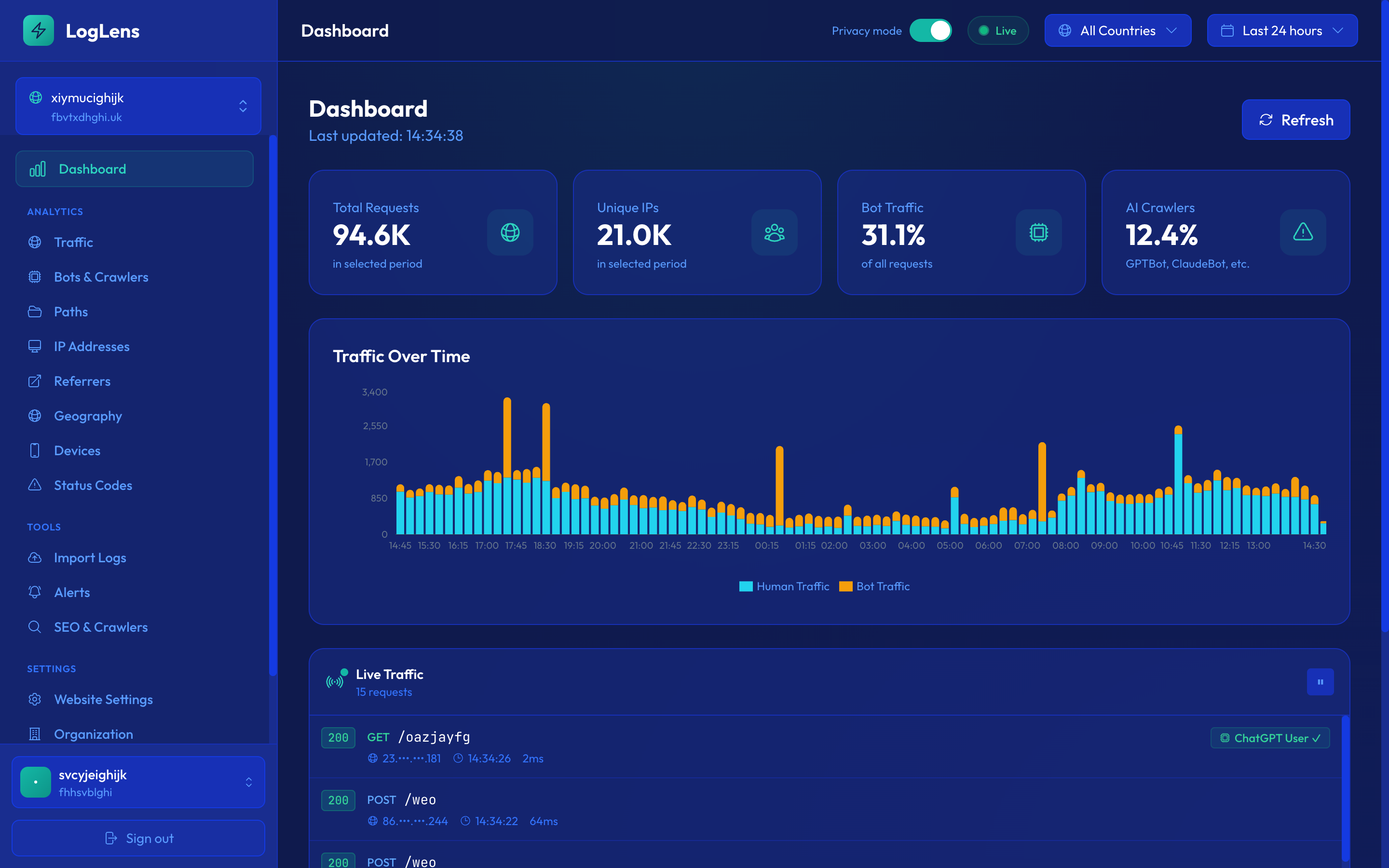
Server logs see everything
Every HTTP request that reaches your server is recorded in access logs, regardless of whether the client runs JavaScript, blocks tracking scripts, or is a bot. Server-side analytics operates at the infrastructure level, not the browser level. There is no script to block, no cookie to reject, no JavaScript to fail. A request arrives, the server logs it — that's it.
If you're using JavaScript analytics as your sole source of truth for traffic numbers, you're underreporting by 30-50% in many cases. This directly affects business decisions around capacity, monetization, and content strategy.
2. Understanding Real Traffic Patterns
JavaScript analytics introduced concepts like "sessions," "visitors," and "page views" that are useful abstractions but hide the underlying reality. Server logs show you what is actually happening: raw HTTP requests hitting your infrastructure.
Requests vs page views vs sessions
A single "page view" in Google Analytics is actually dozens of server requests: the HTML document, CSS files, JavaScript bundles, images, fonts, API calls, and more. Understanding this distinction matters because:
- Total requests — This is your real server load. It determines bandwidth costs, CDN usage, and infrastructure requirements. JS analytics doesn't track this at all.
- Page views — A subset of requests limited to HTML document loads. This is what JS analytics approximates, minus blocked visitors.
- Sessions — A JS-constructed concept based on cookie state and timeouts. Useful for understanding user behavior, but not a measure of server impact.
Bot vs human traffic breakdown
One of the most valuable insights from server log analysis is the bot vs human traffic split. On a typical website, bots account for 30-60% of all requests. This traffic is completely invisible to JavaScript analytics, yet it has real consequences:
- Infrastructure costs — Bots consume bandwidth, server CPU, and CDN resources. If you're capacity-planning based on JS analytics alone, you're sizing for half your actual load.
- Search engine health — Understanding how much of your bot traffic is Googlebot vs Bingbot vs AI crawlers tells you about your search presence.
- Security posture — Aggressive bots, scrapers, and vulnerability scanners are only visible in server logs. Ignoring them means ignoring potential threats.
- Content strategy — Pages that bots visit frequently but humans don't may indicate indexing issues. Pages that humans visit but bots ignore may have discovery problems.
Track your bot-to-human ratio over time. A sudden spike in bot traffic could indicate a new crawler, a scraping campaign, or an attack. A sudden drop in bot traffic could mean search engines are having trouble reaching your site.
3. Geographic Insights Without JavaScript
Understanding where your traffic comes from is essential for content localization, CDN optimization, and market analysis. JavaScript analytics tools rely on browser APIs and cookies to determine location — which means they inherit all the blind spots of client-side tracking.
Server-side IP geolocation
Every HTTP request carries the client's IP address. Server-side geolocation maps this IP to a country, region, and city with high accuracy. The key advantages over JavaScript-based geolocation:
- 100% coverage — Every request is geolocated, including bots, blocked browsers, and users who reject cookies. No gaps in your geographic data.
- No consent required — IP geolocation doesn't require cookies or user consent under most privacy frameworks. You can understand your geographic audience without consent banners or tracking opt-ins.
- Bot geography — See where crawlers are accessing your site from. This can reveal whether you need additional CDN edge locations or if certain regions have latency issues for search engines.
- Higher accuracy for mobile — JavaScript geolocation on mobile often falls back to carrier-level accuracy. IP geolocation from server logs typically provides city-level accuracy regardless of device.
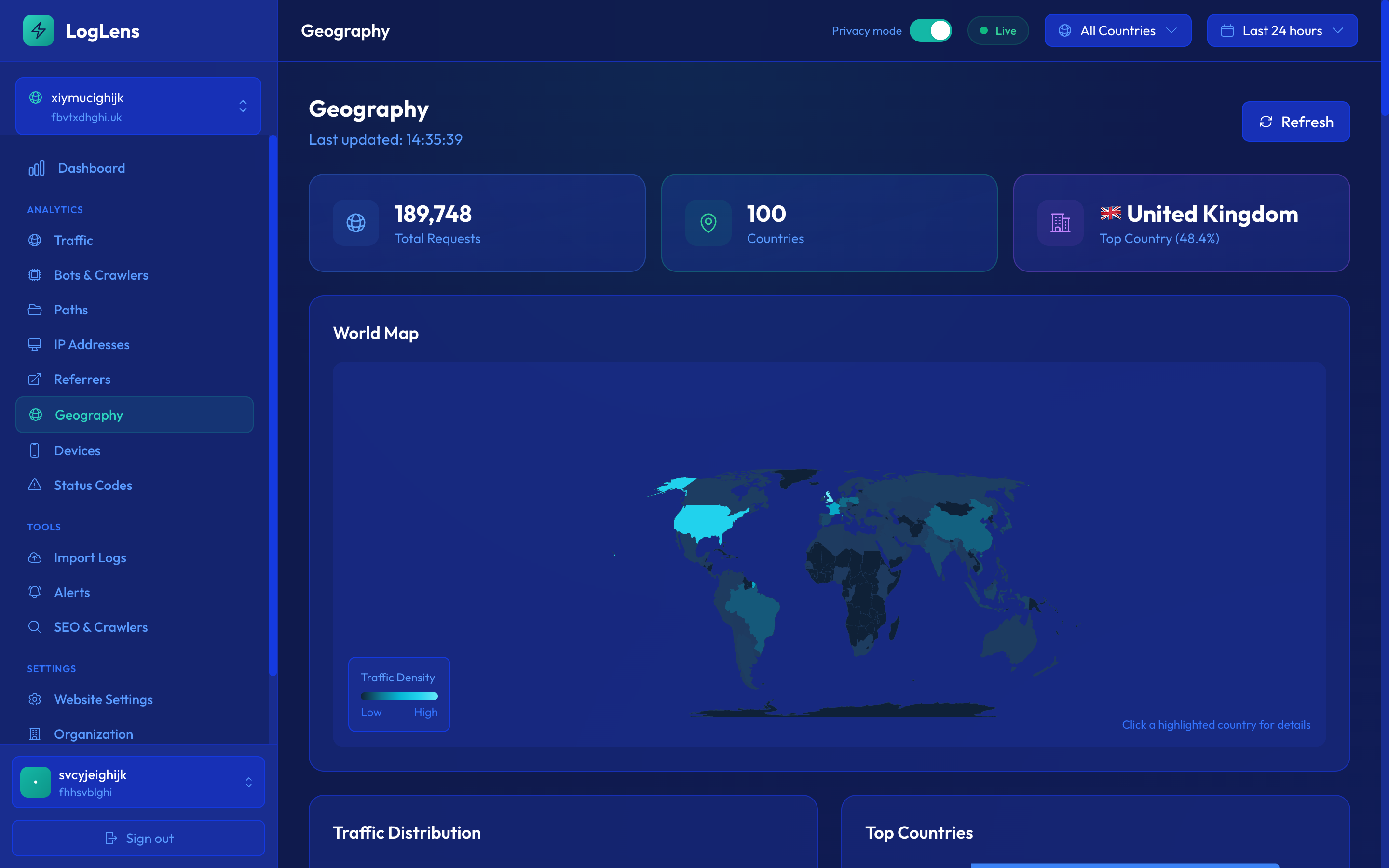
Practical uses for geographic data
- CDN optimization — If 40% of your traffic comes from Europe but your CDN only has US edge locations, you're serving slow pages to nearly half your audience. Server logs make this immediately visible.
- Content localization — Discover unexpected traffic sources. If you're getting significant traffic from Brazil despite having no Portuguese content, there's an opportunity you'd miss with incomplete JS data.
- Compliance targeting — Identify traffic from GDPR, CCPA, or other regulatory jurisdictions to ensure proper handling.
- Attack detection — Sudden spikes from unusual geographies can indicate DDoS attempts, credential stuffing, or scraping campaigns.
Compare your server-log geographic distribution against your JS analytics geographic distribution. The discrepancy will show you exactly which regions have the highest ad blocker usage or bot activity.
4. Error Monitoring
Your website is returning errors right now that you don't know about. Broken links, server failures, and redirect chains are happening on every request cycle, but unless you're monitoring server logs, most of them go unnoticed until a user complains — or a search engine penalizes you.
404 errors: the silent traffic killer
Broken links are one of the most common issues on the web, and they're particularly insidious because they often affect bots more than humans:
- Bot-discovered 404s — Search engine crawlers follow every link they find, including outdated links from external sites, old social media posts, and cached search results. These 404s never appear in JavaScript analytics because no JS executes on an error page that a bot visits.
- Referral 404s — When other sites link to pages that no longer exist, you lose both the referral traffic and the link equity. Server logs show you exactly which external links are pointing to dead pages.
- Internal link rot — As your site evolves, internal links to deleted or moved content accumulate. Server logs reveal every broken internal link that bots and users encounter.
5xx errors: your server is failing
Server errors are more serious than broken links and require immediate attention:
- Intermittent 500 errors — These might only affect 1% of requests, but that's still hundreds or thousands of failed page loads per day. Users experience a broken site; bots may reduce crawl rate.
- 502/503 errors — Gateway and service unavailability errors often indicate infrastructure problems: overloaded origins, failed deployments, or exhausted connection pools.
- Load-dependent errors — Some errors only appear under load. JavaScript analytics can't detect these because the analytics script itself may fail to load during high-traffic periods.
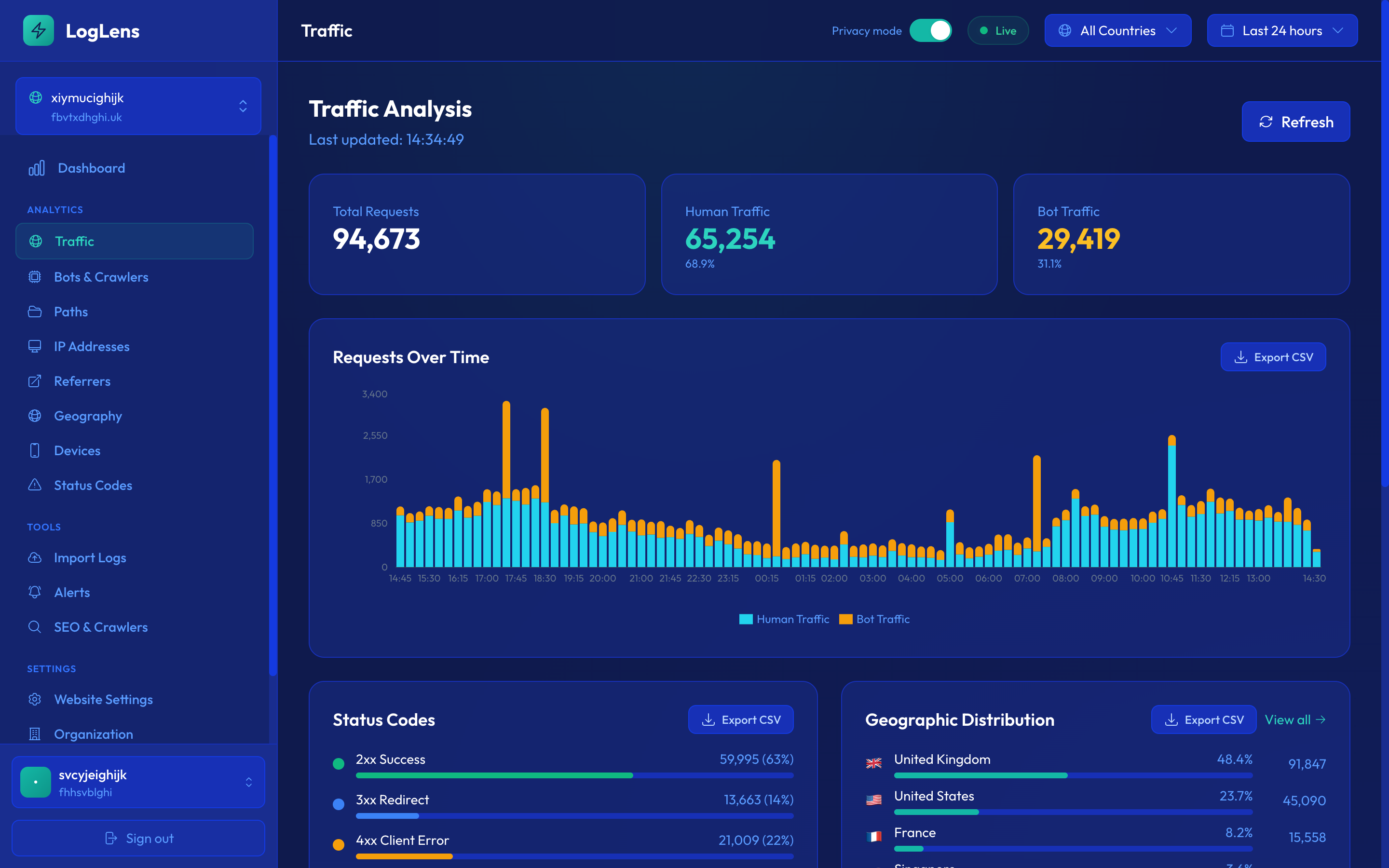
Redirect chains: the hidden performance tax
Redirect chains occur when one redirect leads to another, which leads to another. Each hop adds latency for users and wastes crawl budget for search engines:
- HTTP to HTTPS to www to non-www — A common pattern that creates 3-hop chains, adding 300-500ms to every affected request
- Vanity URLs through link shorteners — Marketing links that redirect through multiple tracking systems before reaching the destination
- Legacy redirects — Old site migrations that left redirect chains in place instead of updating to direct paths
Status codes as a health metric
Your overall status code distribution is one of the most useful health metrics you can track. A healthy site should see:
- 95%+ responses returning 2xx — Successful responses should dominate
- Less than 2% returning 4xx — Some 404s are inevitable, but a high rate signals link rot
- Near-zero 5xx responses — Any server errors should be investigated immediately
- Minimal 3xx responses — Redirects should be cleaned up over time, not accumulated
If your 5xx error rate exceeds 0.1% consistently, investigate immediately. Search engines reduce crawl rate for unreliable servers, and users abandon sites that return errors. Server logs are the fastest way to detect and diagnose these issues.
5. Path Analysis & Content Performance
Understanding which pages receive the most traffic is fundamental to content strategy. But JavaScript analytics only shows you pages viewed by humans with working JS. Server logs show you the complete picture: every path requested by every client.
Most popular pages by actual requests
Server log path analysis reveals your true content performance. Unlike JS page views, request counts include bot traffic, API calls, and asset requests. This gives you a different (and often more useful) ranking of your content:
- Pages that bots love but humans ignore — If Googlebot crawls a page frequently but it gets few human visits, the page may rank poorly despite being well-crawled. The content might need improvement.
- Pages that humans love but bots skip — High human traffic with low bot crawl frequency suggests a discovery problem. The page might not be linked well enough for crawlers to find it, which could limit its search visibility.
- Resource-heavy pages — Some pages generate far more requests than others due to images, API calls, or third-party embeds. Server logs expose these hidden resource consumers.
Response time per path
Server logs record how long each response takes to generate. Analyzing response time by path reveals performance bottlenecks:
- Slow pages — Pages that consistently take more than 1 second to respond need optimization. This is server-side time only, before network latency and client rendering.
- Database-heavy pages — Pages with complex queries often show bimodal response times: fast when cached, slow when the cache is cold.
- Degradation over time — If a page's response time is gradually increasing week over week, something is accumulating: database records, unoptimized queries, or memory leaks.
Bot vs human traffic per path
The most actionable insight from path analysis comes from comparing bot and human traffic patterns side by side:
- Indexing issues — Pages with zero bot traffic despite being in your sitemap are not being discovered. Add internal links, submit them in Search Console, or check if robots.txt is blocking them.
- Crawl waste — Old URLs, parameter variations, or internal search results that bots crawl heavily but humans never visit. These waste crawl budget and should be blocked or redirected.
- Content opportunities — Pages with growing human traffic but declining bot visits may be losing search visibility. Prioritize these for SEO attention before rankings drop.
Export your top 100 paths by request count and compare against your top 100 pages in Google Analytics. The differences will immediately highlight your JavaScript analytics blind spots and reveal your true content performance landscape.
6. Why This Matters for Business Decisions
Incomplete data leads to wrong conclusions. If you're making business decisions based solely on JavaScript analytics, you're working with a partial picture that systematically underrepresents certain audiences and completely ignores server-side reality.
Accurate traffic numbers for reporting
Whether you're reporting to investors, advertisers, or stakeholders, your traffic numbers need to reflect reality:
- Investor reporting — Understating traffic by 30-50% means undervaluing your business. Server logs give you defensible, complete traffic numbers that include every real visitor regardless of ad blockers.
- Ad sales and CPM pricing — If you sell advertising based on traffic volume, JS analytics is costing you money. Real impression counts from server logs justify higher pricing.
- Board presentations — Showing inconsistent numbers from different analytics tools undermines credibility. Server logs provide the single source of truth that other numbers derive from.
Infrastructure planning
Capacity planning based on incomplete data leads to either over-provisioning (wasting money) or under-provisioning (outages during traffic spikes):
- True load measurement — Server logs show actual requests per second, including bots, assets, and API calls. This is what your infrastructure actually handles.
- Traffic forecasting — Historical server log data provides accurate baselines for predicting future load, including bot traffic patterns that follow different cycles than human traffic.
- Cost optimization — Understanding your real traffic composition lets you optimize CDN configurations, caching strategies, and compute resources based on actual usage patterns.
Security and compliance
JavaScript analytics is blind to security-relevant traffic. Server logs are your first line of defense:
- Attack surface visibility — See every request to your server, including path traversal attempts, SQL injection probes, and brute force login attacks.
- Compliance auditing — For regulations requiring access logging (SOC 2, HIPAA, GDPR), server logs are the authoritative record of who accessed what and when.
- Incident response — When a security incident occurs, server logs are the forensic evidence. You can't investigate what you didn't record.
SEO decisions based on real data
Search engine optimization should be based on actual crawler behavior, not approximations:
- Crawler behavior — Server logs show exactly how often each search engine visits, what pages it prioritizes, and how fast your server responds to it.
- AI crawler impact — The rise of AI crawlers (GPTBot, ClaudeBot, and others) is consuming significant bandwidth on many sites. Only server logs reveal the true impact.
- Competitive intelligence — Monitoring what bots crawl most aggressively helps you understand which content is most valuable to search engines and AI models.
Every business metric derived from incomplete traffic data is wrong. Revenue per visitor, conversion rate, cost per acquisition — if the denominator is 30-50% too low, every ratio is skewed. Server-side analytics corrects the denominator.
Key Takeaways
- JavaScript analytics can miss 30-50% of real traffic due to ad blockers, bots, and privacy tools.
- Server logs capture every request regardless of client-side conditions — this is your true traffic picture.
- IP-based geographic data is more complete and doesn't require consent banners.
- Error monitoring through logs catches issues before users report them.
- Business decisions based on incomplete data lead to wrong conclusions — use server-side analytics as your source of truth.
See your complete traffic picture
LogLens captures every request, classifies traffic, and gives you the full story that JavaScript analytics misses.
Join Waitlist