Detect deindexing risk
Spot Googlebot 404s, redirect storms and crawl-rate drops the hour they happen — not 48 hours later in Search Console.
5-minute alerts vs. ~24h batchVerified against official IP ranges — the fakes don't make it through.
Every GPTBot, ClaudeBot, OAI-SearchBot and Perplexity hit — page by page. Impostors spoofing those UAs from random IPs get flagged for blocking.
It's like Google Analytics for log files.
Real-time logs from Cloudflare, Vercel, CloudFront, Kinsta, Shopify, Apache or Nginx — tied to your sitemap, GSC and robots.txt so you know exactly what Googlebot, ChatGPT and every bot is doing to your site.
Every bot verified against its provider's published IP ranges.
Real Googlebot, Bingbot, GPTBot — verified. Scrapers borrowing their UAs from datacentre IPs — flagged for blocking. 200+ bots covered.
Hacking probes, scanner UAs, exposed secrets — in minutes.
Sqlmap, nuclei, /.env probes, SQLi patterns — surfaced with named source IPs, so you block at the WAF before a probe becomes a breach.
Live alerts when Googlebot starts hitting errors.
404s after a deploy. 5xx on key product pages. Crawl frequency dropping on a section. Surfaced in real time — before the rankings notice.
Cloudflare. Vercel. CloudFront. Kinsta. Shopify. Apache. Nginx. One stream, every signal.
Skip JS-snippet bloat and analytics-vendor sampling. We read your CDN or web-server logs in real time — bots, SEO, security, performance — from one source.
Every alert ships with an AI triage: source, paths, action.
When 5xxs spike or scrapers hit, your inbox names the IP, the UA, the URLs, and what to block. Not "something happened — check your logs".
Same crawl-budget data, sitemap correlation, SEO alerts.
All the crawler analytics legacy tools sell for $75k/yr. Multi-site, multi-seat, no per-consultant pricing. Free trial, no card needed.
Real content vs. /wp-admin vs. attack probes — per section.
When 60% of Googlebot's hits land on admin paths, redirect loops and 404 ghosts, real content starves. We show the split so you can fix robots.txt.
Live sitemap coverage — not Search Console's "discovered last month".
We cross-reference your sitemap.xml with live crawler activity. Sitemap URLs never crawled — flagged. Orphaned crawled URLs — flagged. The gap is the work.
We'll detect your CDN or web server and tell you how to connect.
A live read-only view of one of our own websites. Real traffic, real bots, real alerts. Identity obfuscated.
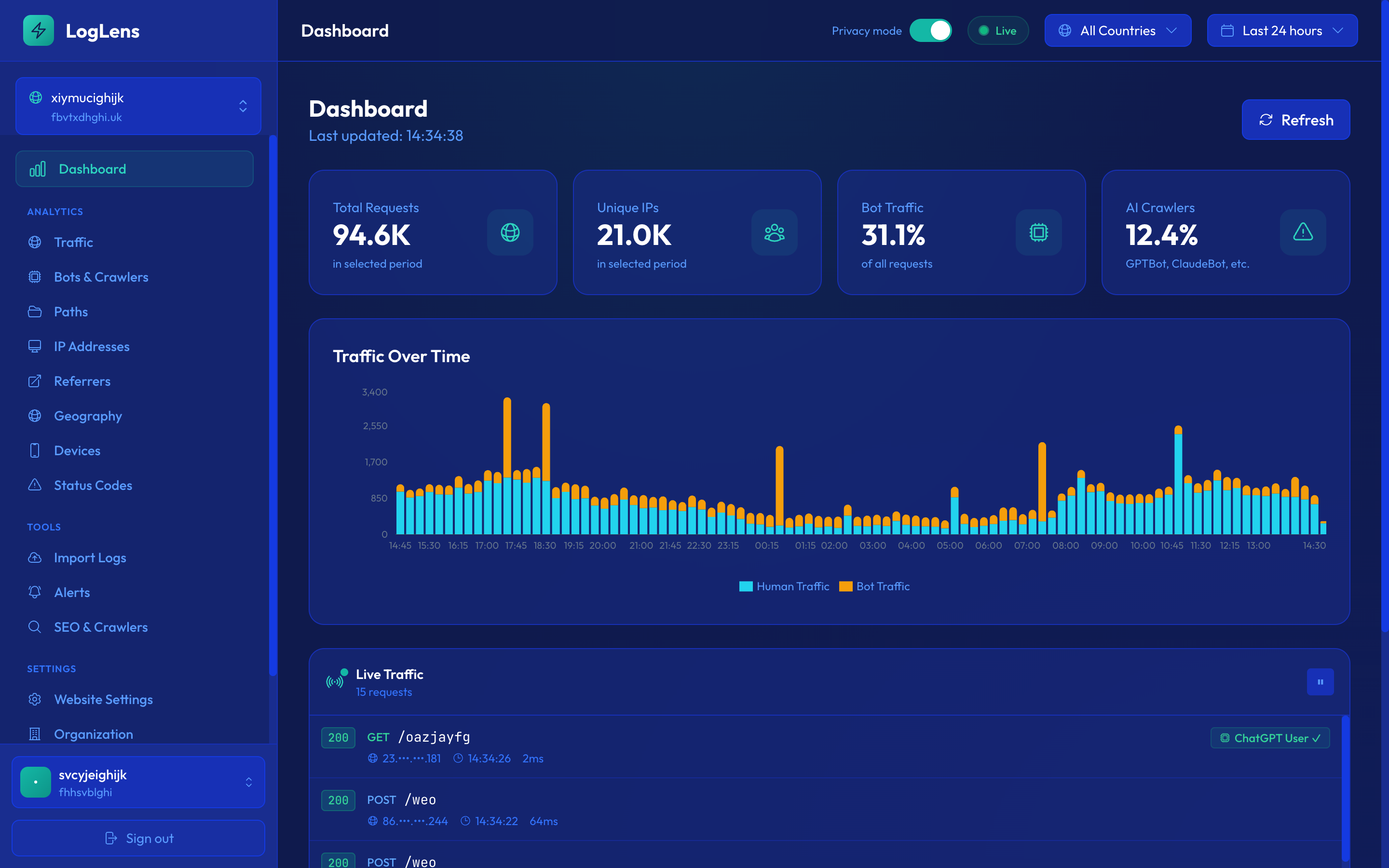
Four jobs every customer hires LogLens for. All four run from the same real-time log stream — no extra setup per use case.
Spot Googlebot 404s, redirect storms and crawl-rate drops the hour they happen — not 48 hours later in Search Console.
5-minute alerts vs. ~24h batchGPTBot, ClaudeBot, Perplexity, OAI-SearchBot — every claim checked against the official IP ranges. Impostors flagged for blocking.
200+ bots, IP-verifiedSqlmap, nuclei, /.env probes, exposed-secret patterns — surfaced with named source IPs before a probe becomes a breach.
See where Googlebot spends its time. /wp-admin hits, redirect loops, 404 ghosts — broken down by section so you can fix robots.txt with intent.
Six user types we built LogLens around. Each has a specific problem existing tools don't solve in time.
In-house SEO lead at a growing content or SaaS site
"I deployed sitemap changes yesterday. No idea if Googlebot has seen them. Search Console won't tell me for 48 hours."
Real scenario: Friday 4pm URL-structure deploy. By Saturday 8am LogLens alerts: Googlebot hit 1,247 of your old URLs and got 404s because the redirect rules missed a pattern. You fix it before Monday traffic. Search Console wouldn't have shown you until Tuesday — and by then Google has already started deindexing.
Technical-SEO agency managing 20–200 client sites
"A crawler seat × every client × every consultant doesn't scale. Enterprise platforms start at $75,000/yr."
Real scenario: You manage 50 client sites. One LogLens account, every consultant on the team has access, every client gets a shared read-only dashboard link. When something breaks on any client's site, the team sees it in real time — not when the consultant remembers to re-run a desktop log analysis next month.
New 2026 role — "SEO, but for AI answers"
"I need to know if GPTBot, ClaudeBot and OAI-SearchBot are actually reading my content. Are they? Which pages? Is my crawl-to-refer ratio good or bad?"
Real scenario: GPTBot fetched 847 of your product pages last week, verified against OpenAI's official IP ranges. Your /pricing page is being crawled 3× more than competitors'. Your ClaudeBot activity dropped 40% last Wednesday — LogLens shows the timing coincides with a robots.txt update. You revert the change the same day.
Engineering at a high-traffic site or web app
"Attack traffic hammered /wp-login.php yesterday and took the site down. Our infra alerts saw 'high CPU', not 'attack in progress'. SEO tooling missed it because the traffic was tagged 'human'."
Real scenario from a LogLens customer: A single datacentre IP sent 114,838 POSTs to /blog//wp-login.php in six hours, rotating 20+ fake browser UAs to evade detection. Traditional monitoring saw only "high CPU load". LogLens alerted within the first hour with the attacker IP named, the attack path identified, and a "scraper rotating UAs" label. Rate-limited at the CDN before the on-call engineer had their first coffee.
SEO / ops at a Shopify Plus, BigCommerce, or Vercel Commerce store
"My platform doesn't give me server logs. Google Search Console is always 2–3 days behind. I'm flying blind on what crawlers are doing."
Real scenario: Black Friday prep pages launched Tuesday. By Friday morning LogLens shows Googlebot hadn't touched them — a leftover Disallow: /collections/holiday-* in robots.txt from last year's campaign. You fix it with 10 days to traffic week. With batch-based SEO tools, you'd have found out in Search Console after the sale.
SEO and web-ops lead at a site routinely crawled by scrapers and bot impersonators
"Everyone claims to be Googlebot. Half of them aren't. My analytics tool can't tell the difference. Meanwhile the real Googlebot is getting rate-limited by my WAF because it can't distinguish either."
Real scenario: LogLens verifies every claimed bot against its official published IP ranges. Fake Googlebots get flagged bot_verified: false, status: unverified. You set alerts on unverified-bot surges. Your WAF whitelists real Googlebot IPs (from LogLens's verified list) so legitimate crawl isn't throttled.
Most SEO log tools take yesterday's logs, load them overnight, and give you a report next morning. That means every regression has 12–48 hours to hurt you before anyone notices. LogLens sees events as they happen, classifies them in-flight, and alerts within five minutes.
Logs exported daily from your CDN, uploaded to the analyzer, processed overnight, reported on in the morning. By then the damage has been done.
Cloudflare, Vercel, CloudFront, Kinsta, Shopify, Apache, or Nginx logs stream into LogLens as they happen. Every request is classified, crawler-verified, and anomaly-scored in-flight. Alerts fire the moment something looks off.
This is not hypothetical. A LogLens customer — a UK comparison site — had a brute-force attack against /blog//wp-login.php
from a single datacentre IP pushing 114,838 hits. LogLens caught it within one 5-minute window.
A batch tool would have reported it the next morning, long after the attacker had
already taken the site down.
Logs tell you what actually happened. Sitemaps tell you what should have happened. Search Console tells you what Google saw. robots.txt tells you what you allowed. Most tools have one of these. LogLens has all four, tied together in real time.
What actually happened on the origin. Every request, every bot, every status code.
What you want crawled. Fetched and diffed daily, changes detected automatically.
What Google actually shows in search. Pulled via the official API.
What you allowed. Change-tracked so you can correlate drops to policy edits.
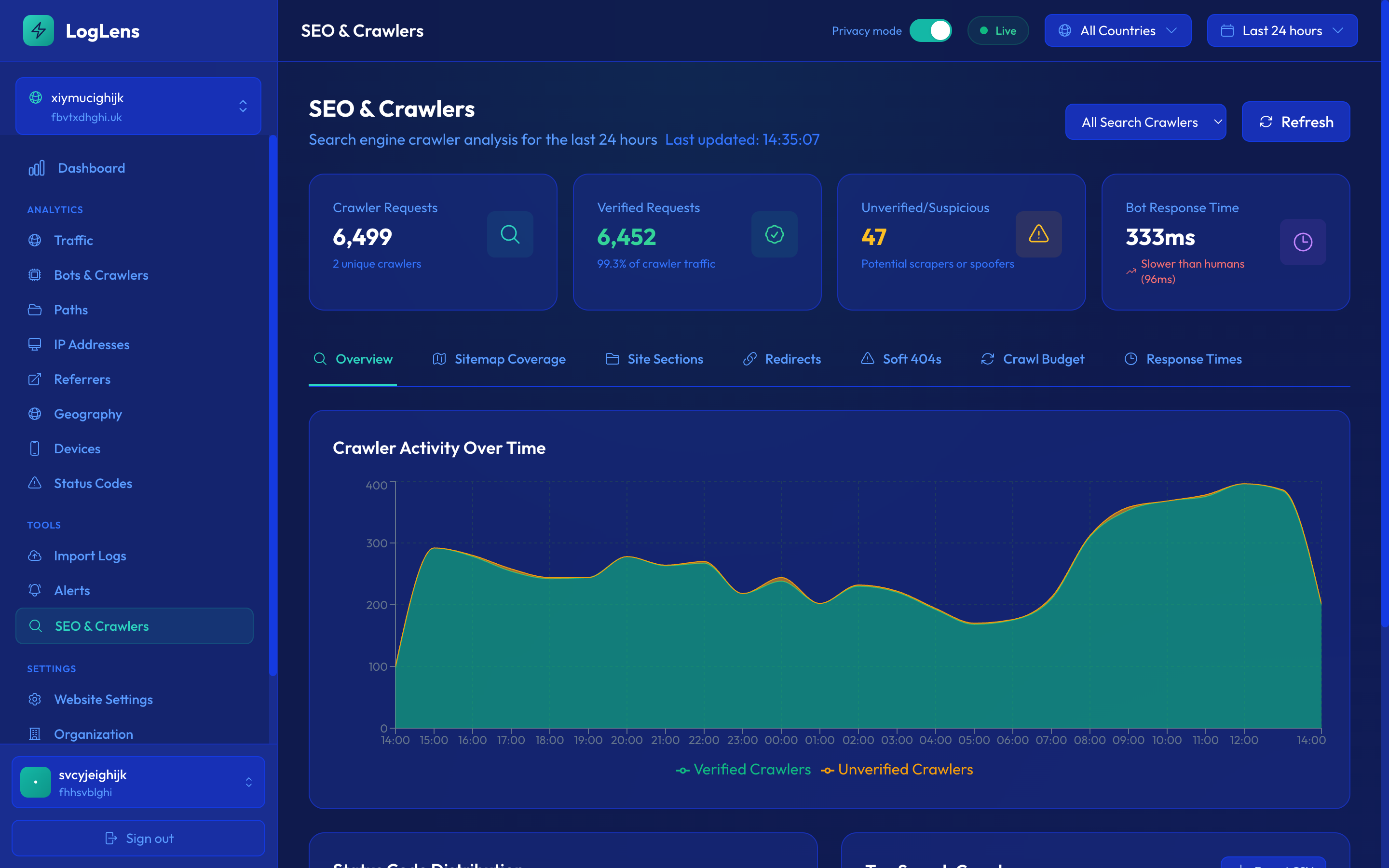
Every site has a finite amount of time Googlebot is willing to spend. If 40% of that goes to 404s, redirects, and attack probes, only 60% lands on the pages you actually want indexed.
LogLens shows you — in real time — where Googlebot is spending its budget. Which URLs waste it. Which sections are over- or under-served. Whether that cheap redirect rule you added last month now accounts for 18% of all crawler hits.
Nothing else on the market shows you this. Desktop analysers show you what you uploaded. Search Console shows you aggregates. Only LogLens shows you the behaviour, live, broken down by intent.
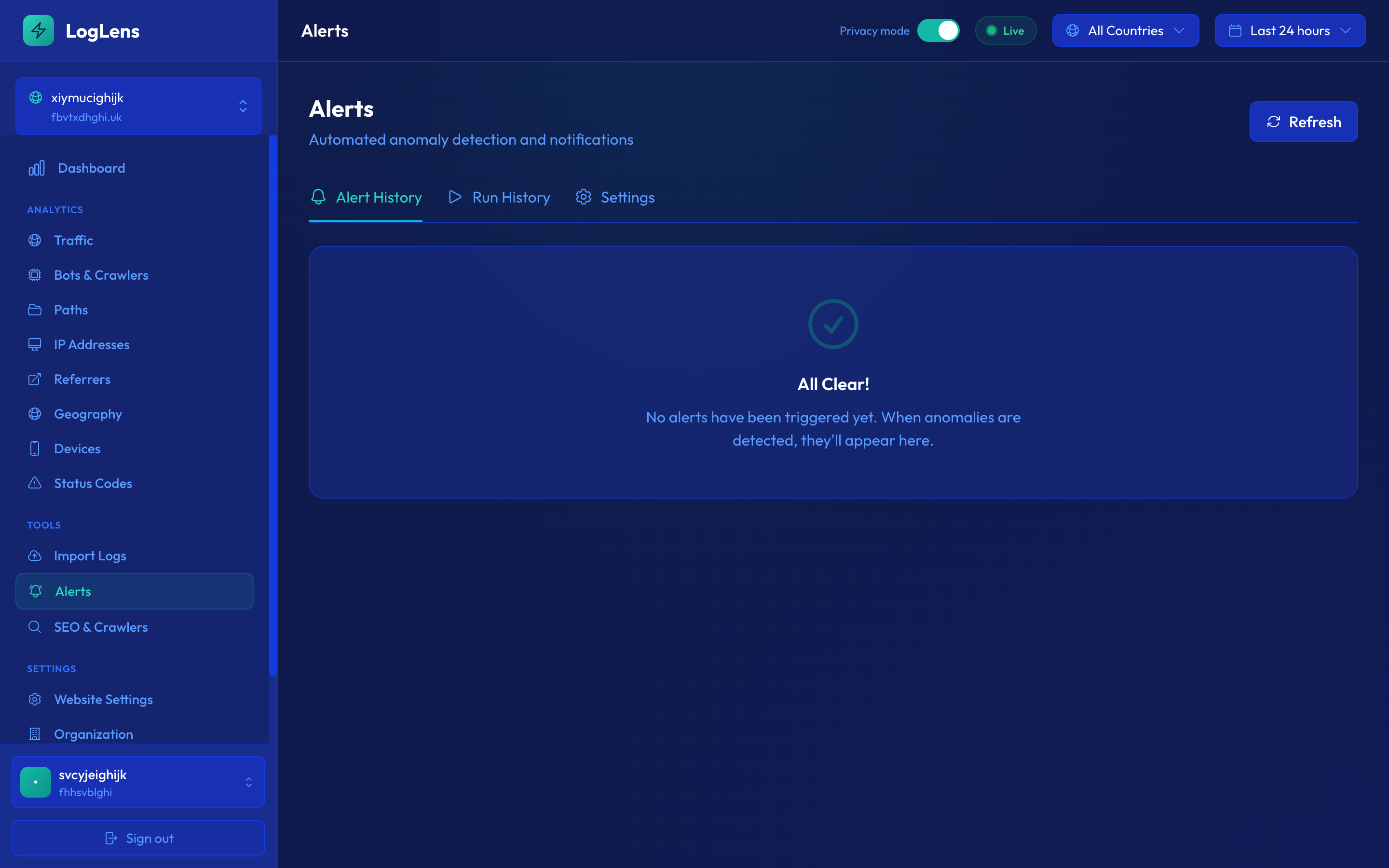
Every alerting tool can tell you something is wrong. Most of them can't tell you what is wrong or who is doing it. LogLens alerts name the specific IP, the specific crawler, the specific paths — so you know exactly what to do when one lands in your inbox.
Every alert runs an enrichment query against your log history and checks reachability. We won't tell you your site is down if a 200 HEAD probe says it isn't. We won't tell you about a redirect storm without naming the IP causing it.
45.86.xxx.xxx (Singapore datacentre) sent 1,508 requests
using 20 different user-agents. That's a scraper rotating UAs to evade detection, not a site problem.
The redirects are your apex→www canonicalisation working correctly. Consider rate-limiting this IP at your CDN.
/blog (245), /products/xyz (189), /pricing (87).
An AI crawler stepping up ingestion — check robots.txt if you don't want your content used for training.
Each one watches a different signal. Every alert names the IPs, paths, and crawlers responsible — and runs a reachability probe before sending so we don't tell you your site is down when it isn't.
Googlebot, Bingbot, or another major search bot has stopped crawling. Names which one + the rate change. Catches deindexing risks before Search Console does.
A search or AI crawler's activity changed by 3×+. Names the bot, top crawled pages, and whether it's verified against official IP ranges.
Search engines are hitting errors on your pages. Lists affected bots, status codes, and the specific URLs failing.
Surge in 404 responses. Lists the top broken URLs, which are being hit by Googlebot/Bingbot, and how many unique IPs each.
Origin or backend failing. Lists the top failing endpoints with hit counts so engineers know what to deploy-fix.
Surge in 4xx responses. Status-code breakdown shows whether it's 404, 401, 403, or 429. Suppresses noise from WAF blocks unless verified search bots are affected.
Traffic has dropped to ~zero. Runs a live HTTP probe of your homepage before alerting — so you only get woken up when the site really is down.
Average response time has spiked. Lists the slowest URLs with average + max latency, weighted by traffic, so you know what to fix first.
Volume far above baseline. Lists the most-hit URLs — viral content concentrates on a few pages, attacks target endpoints like /wp-login.php.
Real-user traffic dropped while bot traffic stayed stable. Suggests routing, SEO, or UX issues affecting people but not crawlers.
3xx responses surged. Names the top source IP + UA-rotation pattern (so you can tell scrapers apart from real config issues), plus the most-redirected URLs.
Catch-all for unusual traffic that doesn't match a specific issue. Tightly throttled to avoid noise on small sites.
Bots claiming to be Googlebot/Bingbot from unverified IP ranges. Lists the targeted URLs — usually a scraper trying to bypass robots.txt rules.
Mix of bot vs human traffic has changed materially. Often signals new crawler activity, scraping, or a CDN/WAF rule change.
Scanner activity targeting known-vulnerable paths (/.env, /wp-config.php, /.git/config), known scanner UAs (sqlmap, nuclei, nikto), and SQLi / path-traversal / XSS / Log4Shell signatures. Promoted to critical if any probe gets a 200/30x — meaning the resource may exist on your origin.
Daily scan for tokens, JWTs, AWS access keys, Stripe live keys, and similar high-precision patterns appearing in your URLs. Once a secret lands in a URL it lives in CDN logs, browser history, and referer headers — assume it’s compromised and rotate.
Sudden drop or surge in GPTBot, ClaudeBot, Perplexity-Bot, Google-Extended. Useful for tracking AI training exposure and the impact of robots.txt changes.
Cadence: every 5 minutes on Starter and above, every 30 minutes on Solo, every hour on Free. All alerts include enrichment context — the affected IPs, URLs, crawlers — so you know exactly what to do.
Our pricing is based on requests, not visitors — because logs see everything: every page, every image, every JS file, every bot. Drop in your monthly visitors and we'll give you a conservative estimate.
Why visitors ≠ requests. A single visitor loading one page generates dozens of requests — the HTML, plus every CSS file, image, JavaScript bundle, font, and any AJAX/API calls the page fires. On a typical content site, one page view is around 25 requests; on a heavier ecommerce or app surface, it can be 50+.
And then there's bot traffic. On most public-facing sites, 30–60% of all requests come from search crawlers, AI bots, monitoring tools, scrapers, and feed readers. Logs see every one of them — that's the point.
Don't overthink the estimate. Once you sign up, the free 14-day trial runs against your real traffic. After about a week we'll have enough data to recommend the exact plan that matches your actual volume — and you can switch (up or down) any time. We also opt-in overage protection so you never get a surprise bill if a viral spike or a scraper hits.
Start free, upgrade as you grow. All paid plans include a 14-day free trial. Save 20% with annual billing.
Try LogLens on one site — no card needed
or $190/year — save 20%
or $490/year — save 20%
or $1,490/year — save 20%
or $4,990/year — save 20%
For 500M+ requests, SSO, SLA, DPA
All paid plans include overage protection (you opt in, set a cap, we bill in $10 increments). Overage is a flat $2 per extra million requests on every paid plan.
The fastest answers — and an AI you can ask anything else.
Google Analytics only tracks visitors who execute JavaScript — humans with cookies enabled. LogLens reads server / CDN access logs, so it sees every request: bots, crawlers, AI agents, mobile-app HTTP traffic, scrapers, anything that can't or won't run JS.
They're complementary, not competing. Use GA for human user behaviour and conversion. Use LogLens for SEO, bot management, security, and ops.
Real-time: Cloudflare (worker), AWS CloudFront (Kinesis Firehose), Vercel (Log Drain), Kinsta managed WordPress (API log pull), Shopify (via a free Cloudflare zone), Apache / Nginx (Vector agent).
Historical / file upload: Apache or Nginx access logs, CloudFront standard or real-time logs, and Events CSV exports from other log analysers. Auto-detected on upload.
Not on the list? Use the compatibility checker at the top of the page — it'll detect your stack and tell you what to do.
First request to dashboard: typically 5–10 seconds end-to-end. Alerts fire within minutes of a threshold being crossed.
Yes — drag-and-drop Apache, Nginx or CloudFront logs, or an Events CSV export from another log analyser. Auto-detected, deduplicated against any real-time data, merges cleanly into your dashboard. Imports don't count against your monthly request quota.
AWS eu-west-2 (London). Encrypted at rest and in transit. We don't sell data, we don't aggregate across customers, we don't run ads. DPA available on request.
14-day full-access trial. Connect your site, import historical logs, see exactly what real-time analytics looks like for your specific traffic. After 14 days the trial expires; data stays for 7 more days, then is deleted unless you claim the account. No credit card required to start.
Yes. Every plan has unlimited users. Websites included: Free and Solo 1, Starter 5, Growth 15, Pro 50, Enterprise unlimited. Extra sites can be added at $10/site/month (up to 2 more on Solo, 5 on Starter, 15 on Growth, no ceiling on Pro). Team members get role-based access (owner, admin, member, viewer).
Solo and above can opt-in to overage billing — pay-as-you-go for requests beyond your plan's quota with a cap you set. Without opt-in, real-time ingestion pauses (alerting continues) until the next billing cycle. Imports never count against the quota.
In most cases, no. Cloudflare = a Worker (no server changes). CloudFront = a Kinesis Firehose stream pointed at our endpoint. Vercel = a Log Drain. Kinsta = nothing at all — we pull your logs via the Kinsta API with just an API key. Shopify = a free Cloudflare zone in front of your store (Orange-to-Orange) running our Worker. Apache or Nginx = our self-hosted Vector agent (10-minute install) for live streaming, or drag-and-drop upload for historical files.
Yes — and it verifies them against the bots' published IP ranges, so you can tell legitimate GPTBot/ClaudeBot/PerplexityBot traffic from scrapers using their User-Agent string. Per-bot crawl frequency, top URLs, and verification status live on the Bots & Crawlers page.
Ask LogLens AI directly — same brain as the chat bubble, inline below.
Free tier includes real-time ingestion, full SEO integration, and unlimited alerts. No credit card. Five-minute setup.